


🙌 Gato GraphQL teraz w pełni obsługuje Advanced Custom Fields (ACF)!

Wydanie v11.3 Gato GraphQL z ubiegłego tygodnia wprowadza mutacje meta.
W połączeniu z polami meta oraz funkcjami udostępnionymi przez rozszerzenia PRO, mutacje meta pozwalają nam na pełną interakcję z wtyczką Advanced Custom Fields (ACF), umożliwiając zarówno pobieranie, jak i mutowanie pól niestandardowych.
Oznacza to, że Gato GraphQL teraz w pełni obsługuje ACF! 🎉🥳👏🍾🙌🎊🍻
Oto kilka queries demonstrujących sposób pobierania i mutowania pól niestandardowych, dla wszystkich typów pól obsługiwanych przez ACF:
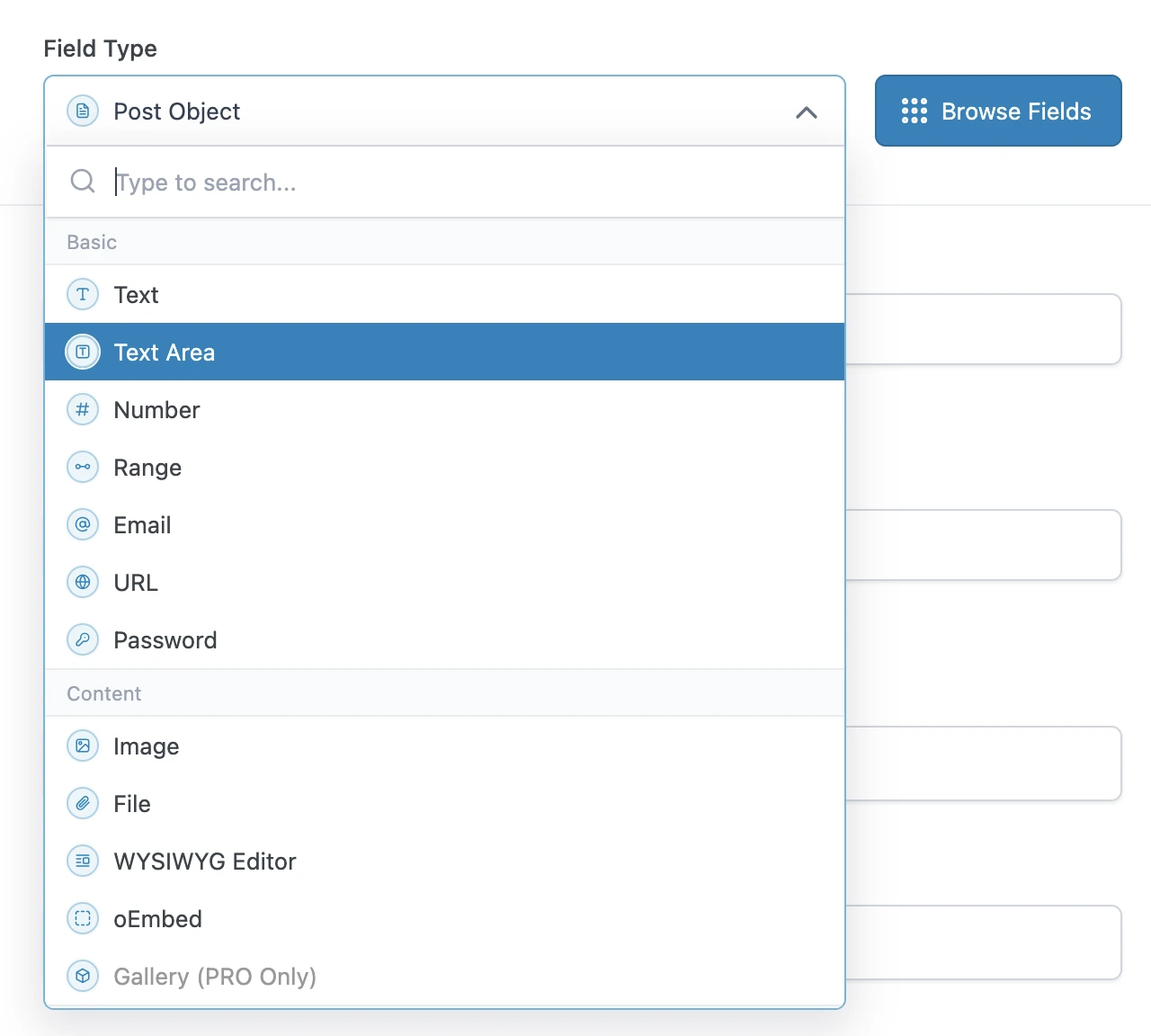
Pobieranie podstawowych typów pól
Podstawowe typy pól ACF można pobierać bezpośrednio, używając pola metaValue:
query GetPost {
post(by: { id: 1 }) {
text: metaValue(key: "text_field")
textarea: metaValue(key: "textarea_field")
number: metaValue(key: "number_field")
range: metaValue(key: "range_field")
email: metaValue(key: "email_field")
url: metaValue(key: "url_field")
password: metaValue(key: "password_field")
}
}Pobieranie typów pól treści
Jeśli pole niestandardowe jest relacją (np. obraz lub plik), możemy wyeksportować ID(s) z pól meta, a następnie natychmiast pobrać te encje (typu Media) w kolejnym zapytaniu.
W przeciwnym razie jest to prosty typ pola i możemy go pobrać bezpośrednio za pomocą metaValue:
query GetPostDataAndExportRelationships {
post(by: { id: 1 }) {
# Image field type
imageId: metaValue(key: "image_field")
@export(as: "imageId")
# File field type
fileId: metaValue(key: "file_field")
@export(as: "fileId")
# WYSIWYG editor field type
wysiwyg_editor: metaValue(key: "wysiwyg_editor_field")
# Oembed field type
oembed: metaValue(key: "oembed_field")
}
}
query QueryPostRelationships
@depends(on: "GetPostDataAndExportRelationships")
{
# Query the image
relationshipImage: mediaItem(by: { id: $imageId }) {
id
src
}
# Query the file
relationshipFile: mediaItem(by: { id: $fileId }) {
id
src
}
}Pobieranie typów pól wyboru
Typy pól wyboru można pobierać jak prosty typ pola, używając metaValue.
ACF przechowuje tablice wartości w jednym wpisie, zakodowane jako ciąg JSON, dlatego należy używać pola metaValue (zamiast metaValues) do pobrania tablicy.
Dla wartości logicznych używamy pola _equals, aby przekonwertować je z String na Boolean:
query GetPost {
post(by: { id: 1 }) {
# Select field type - Whether a single or multiple values, we always use `metaValue`
select: metaValue(key: "select_field")
multiSelect: metaValue(key: "multi_select_field")
# Checkbox field type
checkbox: metaValue(key: "checkbox_field")
# Radio button field type
radioButton: metaValue(key: "radio_button_field")
# Button group field type
buttonGroup: metaValue(key: "button_group_field")
# True/False field type
trueFalseAsString: metaValue(key: "true_false_field")
trueFalse: _equals(value1: $__trueFalseAsString, value2: "1")
}
}Pobieranie relacyjnych typów pól
Jeśli pole niestandardowe jest relacją (np. post, użytkownik, taksonomia itp.), możemy wyeksportować ID z pól meta, a następnie natychmiast pobrać te encje (typu Post, User, Taxonomy itp.) w kolejnym zapytaniu.
W przeciwnym razie jest to prosty typ pola i możemy go pobrać bezpośrednio za pomocą metaValue:
query GetPostDataAndExportRelationships {
post(by: { id: 1 }) {
link: metaValue(key: "link_field")
# Post Object field type
post_object: metaValue(key: "post_object_field")
@export(as: "post_object_id")
# Multiple Post Object field type
post_objects: metaValue(key: "post_objects_field")
@export(as: "post_object_ids")
# Page Link field type
page_link: metaValue(key: "page_link_field")
@export(as: "page_link_id")
# Multiple Page Link field type
page_links: metaValue(key: "page_links_field")
@export(as: "page_link_ids")
# Relationship field type
relationships: metaValue(key: "relationship_field")
@export(as: "relationship_ids")
# Taxonomy field type
categoryTaxonomy: metaValue(key: "category_taxonomy_field")
@export(as: "category_taxonomy_ids")
tagTaxonomy: metaValue(key: "tag_taxonomy_field")
@export(as: "tag_taxonomy_ids")
# User field type
user: metaValue(key: "user_field")
@export(as: "user_id")
# Multiple User field type
users: metaValue(key: "users_field")
@export(as: "user_ids")
}
}
query QueryPostRelationships
@depends(on: "GetPostDataAndExportRelationships")
{
# Query the post
postObject: customPost(by: { id: $post_object_id }, status: any) {
id
title
}
# Query the list of posts
postObjects: customPosts(filter: { ids: $post_object_ids, status: any }, pagination: { limit: -1 }) {
id
title
}
# Query the page
pageLink: page(by: { id: $page_link_id }, status: any) {
id
title
}
# Query the list of pages
pageLinks: pages(filter: { ids: $page_link_ids, status: any }, pagination: { limit: -1 }) {
id
title
}
# Query the relationship post
relationships: customPosts(filter: { ids: $relationship_ids, status: any }, pagination: { limit: -1 }) {
id
title
}
# Query the list of categories
categoryTaxonomy: categories(filter: { ids: $category_taxonomy_ids }, taxonomy: "category") {
id
name
}
# Query the list of tags
tagTaxonomy: tags(filter: { ids: $tag_taxonomy_ids }, taxonomy: "post_tag") {
id
name
}
# Query the user
user: user(by: { id: $user_id }) {
id
name
}
# Query the list of users
users: users(filter: { ids: $user_ids }, pagination: { limit: -1 }) {
id
name
}
}Pobieranie typów pól daty
Ponieważ data jest przechowywana jako ciąg znaków w formacie "YMD" (np. "20240320"), musimy ją przetworzyć na znacznik czasu (timestamp), a następnie przekazać do funkcji _date.
query GetPost {
post(by: { id: 1 }) {
# Date Picker field
dateAsString: metaValue(key: "date_picker_field")
dateYear: _strSubstr(string: $__dateAsString, offset: 0, length: 4)
dateMonth: _strSubstr(string: $__dateAsString, offset: 4, length: 2)
dateDay: _strSubstr(string: $__dateAsString, offset: 6, length: 2)
dateAsTimestamp: _makeTime(year: $__dateYear, month: $__dateMonth, day: $__dateDay, hour: 0, minute: 0, second: 0)
date: _date(format: "Y-m-d", timestamp: $__dateAsTimestamp)
# Date Time Picker field
dateTime: metaValue(key: "date_time_picker_field")
# Time Picker field
timeAsString: metaValue(key: "time_picker_field")
timeHours: _strSubstr(string: $__timeAsString, offset: 0, length: 2)
timeMinutes: _strSubstr(string: $__timeAsString, offset: 3, length: 2)
timeSeconds: _strSubstr(string: $__timeAsString, offset: 6, length: 2)
googleMap: metaValue(key: "google_map_field")
colorPicker: metaValue(key: "color_picker_field")
}
}Mutowanie dowolnego typu pola
Używamy pól meta do dodawania, aktualizowania i usuwania pól niestandardowych ACF.
Ta query aktualizuje wiele pól niestandardowych ACF, przekazując pojedynczy obiekt JSON do mutacji updatePost.
(Zauważ, że JSON zawiera tablice wartości, nawet gdy element jest pojedynczą wartością.)
mutation UpdatePost($postId: ID!) {
updatePost(
input: {
id: $postId
meta: {
text_field: ["New text value"],
textarea_field: ["New textarea value"],
select_field: ["New select value"],
multi_select_field: ["Choice 1", "Choice 2"],
number_field: [42],
date_picker_field: ["20240320"],
}
}
) {
status
errors {
__typename
...on ErrorPayload {
message
}
}
post {
id
text: metaValue(key: "text_field")
textarea: metaValue(key: "textarea_field")
select: metaValue(key: "select_field")
multiSelect: metaValues(key: "multi_select_field")
number: metaValue(key: "number_field")
date: metaValue(key: "date_picker_field")
}
}
}Ta query aktualizuje pola niestandardowe ACF zbiorczo, używając mutacji updateCustomPostMeta:
mutation UpdatePost($postId: ID!) {
updateCustomPostMetas(inputs: [
{ id: $postId, key: "text_field", value: "New text value" },
{ id: $postId, key: "textarea_field", value: "New textarea value" },
{ id: $postId, key: "select_field", value: "New select value" },
{ id: $postId, key: "multi_select_field", value: ["Choice 1", "Choice 2"] },
{ id: $postId, key: "number_field", value: 42 },
{ id: $postId, key: "date_picker_field", value: "20240320" },
]) {
status
errors {
__typename
...on ErrorPayload {
message
}
}
customPost {
__typename
id
text: metaValue(key: "text_field")
textarea: metaValue(key: "textarea_field")
select: metaValue(key: "select_field")
multiSelect: metaValues(key: "multi_select_field")
number: metaValue(key: "number_field")
date: metaValue(key: "date_picker_field")
}
}
}