
Automatyczne tworzenie metadanych The SEO Framework dla Bricks z Claude
Użyj Claude do automatycznego generowania metadanych SEO Framework z treści elementów tekstowych Bricks






Możemy użyć Claude z rozszerzeniem Bricks, aby wygenerować metadane The SEO Framework na podstawie treści elementów tekstowych Bricks — wszystko za pomocą jednego query Gato GraphQL.
Dzięki rozszerzeniu Automation możemy automatycznie wyzwalać wykonanie tego query, gdy nowa strona Bricks zostanie opublikowana.
To query używa Claude do analizy treści elementów tekstowych Bricks i generowania metadanych The SEO Framework (tytuł i opis) w celu poprawy SEO.
Musimy podać następujące zmienne:
customPostId: Identyfikator custom posta Bricks do zaktualizowaniaanthropicAPIKey: Klucz API dla API Anthropic
Możesz dostosować komunikat systemowy i szablon promptu, aby zmienić sposób, w jaki Claude generuje metadane.
Zapisz query jako nowe Persisted Query z tytułem "Create The SEO Framework metadata for Bricks with Claude", aby można było go użyć w Automation (patrz poniżej).
Oto query GraphQL:
query InitializeGlobalVariables
@configureWarningsOnExportingDuplicateVariable(enabled: false)
{
emptyArray: _echo(value: [])
@export(as: "elementTexts")
@remove
}
query GetBricksData($customPostId: ID!)
@depends(on: "InitializeGlobalVariables")
{
customPost(by:{ id: $customPostId }, status: any) {
id
title
bricksData(filterBy: { include: ["heading", "text"] })
@underEachArrayItem
@underJSONObjectProperty(by: { path: "settings.text" })
@export(as: "elementTexts")
}
}
query GenerateMetadataWithClaude(
$anthropicAPIKey: String!
$maxTokens: Int! = 32000
$promptTemplate: String! = """
You are an SEO expert specializing in metadata optimization.
I need to generate SEO metadata for a WordPress page using The SEO Framework plugin.
Based on the following content from the page, please generate:
1. A compelling SEO title (max 60 chars)
2. A meta description (max 160 chars)
Please respond in JSON format with this structure:
{
"title": "SEO title here",
"description": "Meta description here"
}
Return ONLY the JSON object. Do not include any explanations, markdown formatting, or code blocks. The response must be a valid JSON object starting with { and ending with }.
Content to analyze:
{$encodedContent}
"""
$model: String! = "claude-sonnet-4-0"
)
@depends(on: "GetBricksData")
{
encodedContent: _arrayJoin(
array: $elementTexts,
separator: "\n\n"
)
prompt: _strReplace(
search: "{$encodedContent}",
replaceWith: $__encodedContent,
in: $promptTemplate
)
claudeResponse: _sendJSONObjectItemHTTPRequest(input: {
url: "https://api.anthropic.com/v1/messages",
method: POST,
options: {
headers: [
{
name: "x-api-key",
value: $anthropicAPIKey
},
{
name: "anthropic-version",
value: "2023-06-01"
}
],
json: {
model: $model,
max_tokens: $maxTokens,
messages: [
{
role: "user",
content: $__prompt
}
],
}
}
})
@underJSONObjectProperty(by: { key: "content" })
@underArrayItem(index: 0)
@underJSONObjectProperty(by: { key: "text" })
@export(as: "jsonEncodedMetadata")
}
query ExtractMetadata
@depends(on: "GenerateMetadataWithClaude")
{
jsonEncodedMetadata: _echo(value: $jsonEncodedMetadata)
@remove
decodedMetadata: _strDecodeJSONObject(string: $jsonEncodedMetadata)
seoMetadataTitle: _objectProperty(
object: $__decodedMetadata,
by: { key: "title" }
)
@export(as: "seoMetadataTitle")
seoMetadataDescription: _objectProperty(
object: $__decodedMetadata,
by: { key: "description" }
)
@export(as: "seoMetadataDescription")
}
mutation UpdateSEOFrameworkMetadata($customPostId: ID!)
@depends(on: "ExtractMetadata")
{
updateCustomPost(
input: {
id: $customPostId
meta: {
_genesis_title: [$seoMetadataTitle],
_genesis_description: [$seoMetadataDescription],
_open_graph_title: [$seoMetadataTitle],
_open_graph_description: [$seoMetadataDescription],
_twitter_title: [$seoMetadataTitle],
_twitter_description: [$seoMetadataDescription],
}
}
) {
status
errors {
__typename
...on ErrorPayload {
message
}
}
customPost {
id
metaTitle: metaValue(key: "_genesis_title")
metaDesc: metaValue(key: "_genesis_description")
socialTitle: metaValue(key: "_open_graph_title")
socialDesc: metaValue(key: "_open_graph_description")
twitterTitle: metaValue(key: "_twitter_title")
twitterDesc: metaValue(key: "_twitter_description")
}
}
}Zmienne wyglądałyby następująco:
{
"customPostId": 123,
"anthropicAPIKey": "sk-ant-..."
}Automation
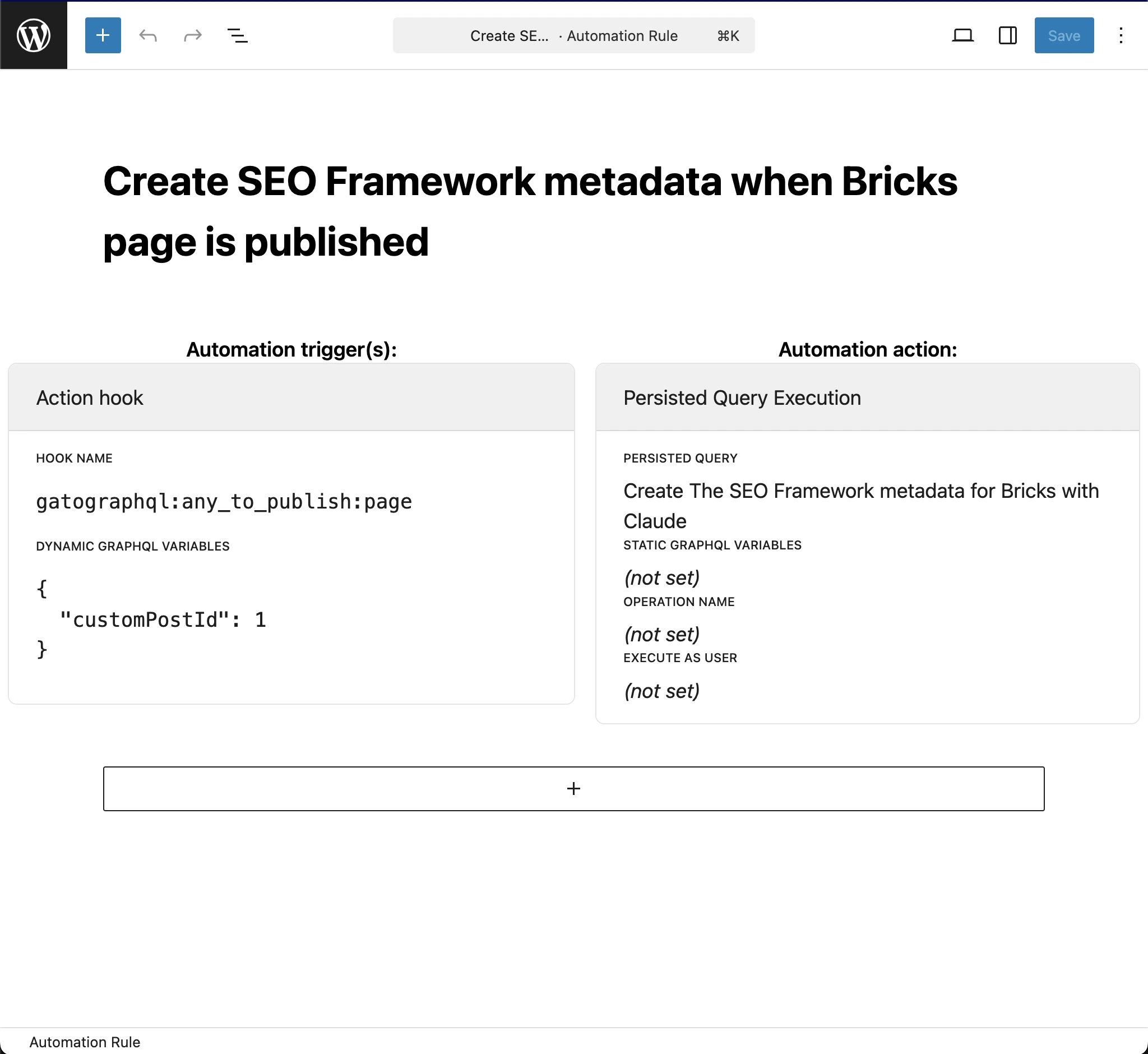
Aby automatycznie wyzwalać wykonanie query, gdy nowa strona Bricks zostaje opublikowana, utwórz nową regułę Automation z następującymi ustawieniami:
- Persisted Query:
"Create The SEO Framework metadata for Bricks with Claude"(czyli ta, którą utworzyliśmy powyżej) - Hook name:
gatographql:any_to_publish:page - Dynamic GraphQL variables:
{
"customPostId": 1
}