

Lekcja 15: Wysyłanie codziennego podsumowania aktywności
Możemy zintegrować Gato GraphQL z WP-Cron, aby automatyzować wykonywanie queries GraphQL realizujących zadania administracyjne w określonych odstępach czasu. (Wymagane jest rozszerzenie Automation.)
W tej lekcji samouczka konfigurujemy WP-Cron tak, aby co 24 godziny wykonywał query GraphQL pobierającą liczbę nowych komentarzy dodanych do witryny i wysyłał te statystyki na wybraną skrzynkę e-mail.
Query GraphQL z codziennymi statystykami nowych komentarzy
Ta query GraphQL wysyła wiadomość e-mail informującą o liczbie nowych komentarzy dodanych do witryny w różnych przedziałach czasowych:
- W ciągu ostatnich 24 godzin
- W ciągu ostatniego roku
- Od początku bieżącego miesiąca
- Od początku bieżącego roku
Tworzymy Persisted Query ze slugiem "daily-stats-by-email-number-of-comments" i następującą zawartością:
query CountComments {
DATE_ISO8601: _env(name: DATE_ISO8601) @remove
timeToday: _time
dateToday: _date(format: $__DATE_ISO8601, timestamp: $__timeToday)
timeYesterday: _intSubtract(subtract: 86400, from: $__timeToday)
dateYesterday: _date(format: $__DATE_ISO8601, timestamp: $__timeYesterday)
time1YearAgo: _intSubtract(subtract: 31536000, from: $__timeToday)
date1YearAgo: _date(format: $__DATE_ISO8601, timestamp: $__time1YearAgo)
timeBegOfThisMonth: _makeTime(hour: 0, minute: 0, second: 0, day: 1)
dateBegOfThisMonth: _date(format: $__DATE_ISO8601, timestamp: $__timeBegOfThisMonth)
timeBegOfThisYear: _makeTime(hour: 0, minute: 0, second: 0, month: 1, day: 1)
dateBegOfThisYear: _date(format: $__DATE_ISO8601, timestamp: $__timeBegOfThisYear)
commentsAddedInLast24Hs: commentCount(filter: { dateQuery: { after: $__dateYesterday } } )
@export(as: "commentsAddedInLast24Hs")
commentsAddedInLast1Year: commentCount(filter: { dateQuery: { after: $__date1YearAgo } } )
@export(as: "commentsAddedInLast1Year")
commentsAddedSinceBegOfThisMonth: commentCount(filter: { dateQuery: { after: $__dateBegOfThisMonth } } )
@export(as: "commentsAddedSinceBegOfThisMonth")
commentsAddedSinceBegOfThisYear: commentCount(filter: { dateQuery: { after: $__dateBegOfThisYear } } )
@export(as: "commentsAddedSinceBegOfThisYear")
}
query CreateEmailMessage @depends(on: "CountComments") {
emailMessageTemplate: _strConvertMarkdownToHTML(
text: """
This is the number of comments added to the site:
| Period | # Comments added |
| --- | --- |
| **In the last 24 hs**: | {$commentsAddedInLast24Hs} |
| **In the last 365 days**: | {$commentsAddedInLast1Year} |
| **Since begginning of this month**: | {$commentsAddedSinceBegOfThisMonth} |
| **Since begginning of this year**: | {$commentsAddedSinceBegOfThisYear} |
"""
)
emailMessage: _strReplaceMultiple(
search: [
"{$commentsAddedInLast24Hs}",
"{$commentsAddedInLast1Year}",
"{$commentsAddedSinceBegOfThisMonth}",
"{$commentsAddedSinceBegOfThisYear}"
],
replaceWith: [
$commentsAddedInLast24Hs,
$commentsAddedInLast1Year,
$commentsAddedSinceBegOfThisMonth,
$commentsAddedSinceBegOfThisYear
],
in: $__emailMessageTemplate
)
@export(as: "emailMessage")
}
mutation SendDailyStatsByEmailNumberOfComments(
$to: [String!]!
)
@depends(on: "CreateEmailMessage")
{
_sendEmail(
input: {
to: $to
subject: "Daily stats: Number of new comments"
messageAs: {
html: $emailMessage
}
}
) {
status
}
}Planowanie wykonania query GraphQL za pomocą WP-Cron
Musimy zaplanować zdarzenie WP-Cron, które wykona hook Gato GraphQL gatographql__execute_persisted_query, przekazując jako argumenty adres e-mail, na który ma zostać wysłana wiadomość, oraz częstotliwość (codziennie).
Możemy to zrobić za pomocą PHP:
wp_schedule_event(
time(),
'daily',
'gatographql__execute_persisted_query',
[
'daily-stats-by-email-number-of-comments',
[
'to' => ['admin@mysite.com']
],
'SendDailyStatsByEmailNumberOfComments',
1 // This is the admin user's ID
]
);Lub za pomocą wtyczki WP-Crontrol:
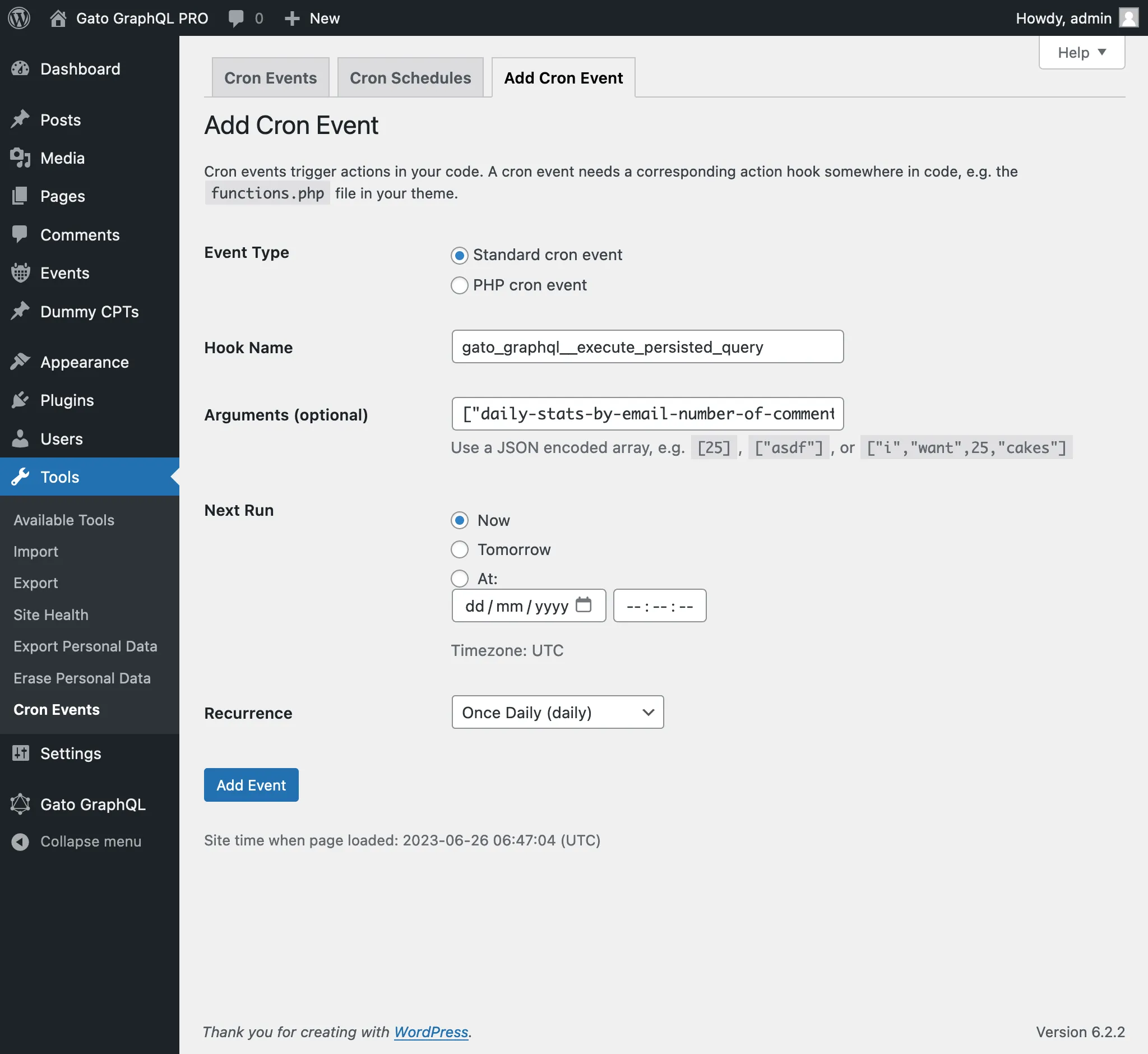
- Event type: Standard cron event
- Hook name:
gatographql__execute_persisted_query - Arguments:
["daily-stats-by-email-number-of-comments",{"to":["admin@mysite.com"]},"SendDailyStatsByEmailNumberOfComments",1] - Recurrence: Once Daily
- argument przekazywany do zdarzenia WP-Cron to ID (jako int) lub nazwa użytkownika (jako string) użytkownika, który musi być zalogowany podczas wykonywania query GraphQL.
(W tym przypadku wartość 1 to ID użytkownika administratora; można było również podać nazwę użytkownika "admin".)
Przekazanie tego argumentu jest zazwyczaj wymagane podczas wykonywania mutations, ponieważ większość z nich wymaga zalogowanego użytkownika (z odpowiednimi uprawnieniami).