

JetEngine CCTS
Integracja z wtyczką JetEngine firmy Crocoblock.
Schemat GraphQL jest wyposażony w pola umożliwiające odpytywanie danych Custom Content Type (CCT).
Pola główne
| Pole | Opis |
|---|---|
jetengineCCTEntries | Zwraca listę wpisów CCT (typ JetEngineCCTEntry). |
jetengineCCTEntryCount | Zwraca liczbę wpisów CCT. |
jetengineCCTEntry | Zwraca pojedynczy wpis CCT (typ JetEngineCCTEntry). |
Slug CCT musi zostać podany przez argument slug (CCT musi być ustawiony jako odpytywalny w ustawieniach wtyczki, patrz poniżej).
Typ JetEngineCCTEntry
W typie JetEngineCCTEntry można odpytywać wartości pól za pomocą:
| Pole | Opis |
|---|---|
id | Identyfikator bazy danych wpisu. |
uniqueID | Unikalny identyfikator wpisu, złożony ze slugu CCT i ID wpisu. |
cctSlug | Slug CCT, do którego należy ten wpis. |
status | Status wpisu (np. publish, draft). |
createdDate | Data utworzenia wpisu. |
createdDateStr | Data utworzenia wpisu sformatowana jako ciąg znaków. |
modifiedDate | Data ostatniej modyfikacji wpisu. |
modifiedDateStr | Data ostatniej modyfikacji wpisu sformatowana jako ciąg znaków. |
authorID | Identyfikator autora wpisu. |
author | Obiekt połączenia z użytkownikiem będącym autorem. |
singleCustomPostID | Identyfikator powiązanego pojedynczego wpisu niestandardowego, jeśli istnieje. |
singleCustomPost | Obiekt połączenia z powiązanym pojedynczym wpisem niestandardowym. |
fieldValues | Obiekt JSON ze wszystkimi polami CCT dla danego wpisu. |
fieldValue(slug) | Do odpytywania pojedynczego pola według slugu. |
Wartości pól CCT
Wartości z fieldValue(slug) oraz z każdego klucza w fieldValues są rzutowane zgodnie z typem pola zdefiniowanym w CCT.
Niejawne pola ID (zawsze rzutowane na int, gdy są obecne i niepuste): id, singleCustomPostID, authorID.
Jak każdy typ pola CCT jest rzutowany w odpowiedzi GraphQL:
float jeśli zawiera punkt dziesiętny; w przeciwnym razie int.true dla 1, true, yes, on (bez rozróżniania wielkości liter).int; "Both" → obiekt { id, url }; w przeciwnym razie bez zmian.int[].int; wielokrotny → int[].Poniższy przykład używa CCT ze slugiem "sample_cct" i polami różnych typów (text, number, gallery itd.).
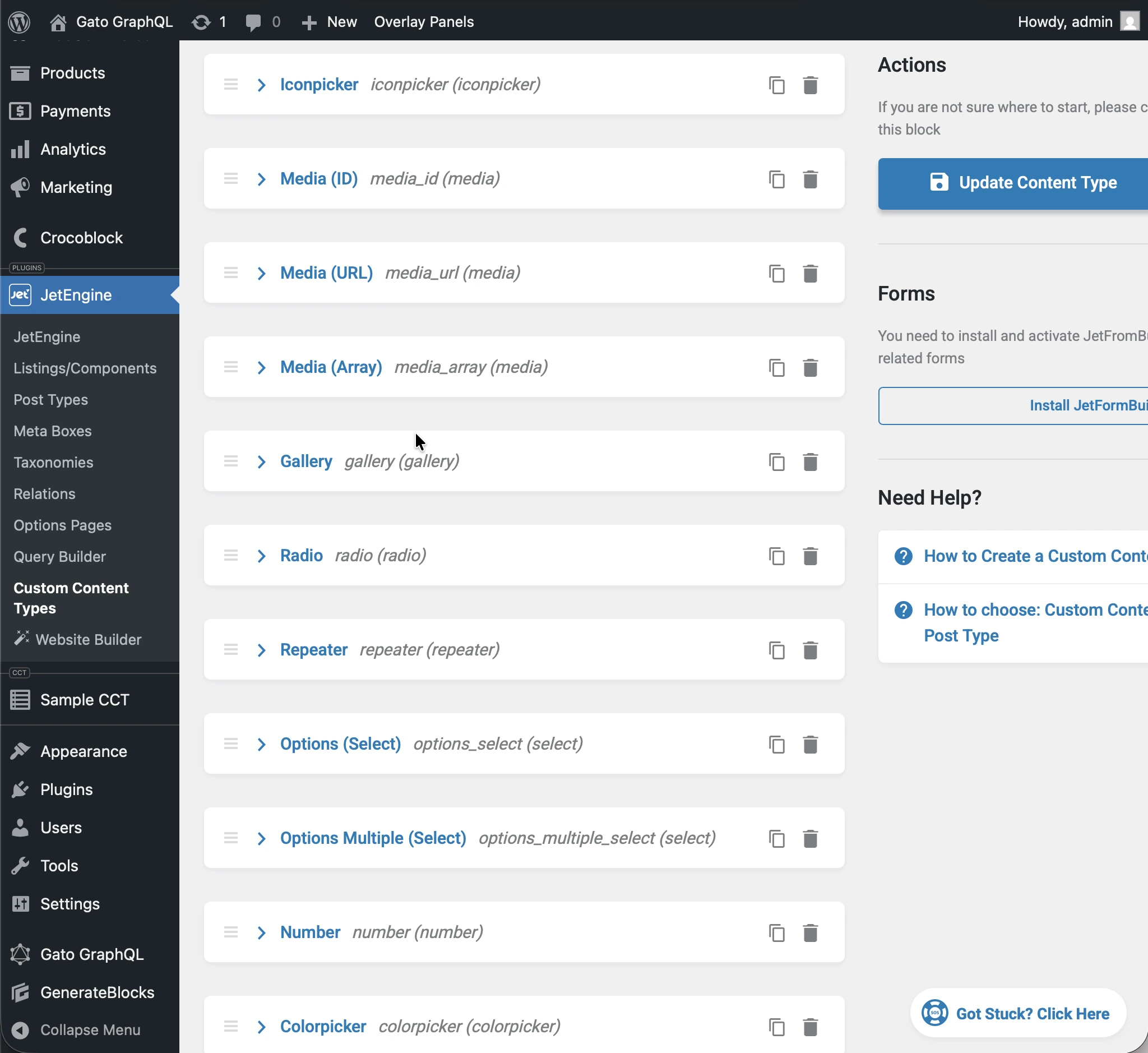
Wykonując następujące query:
query JetEngineCCTEntries {
jetengineCCTEntry(cctSlug: "sample_cct", by: { id: 1 }) {
label_text: fieldValue(slug: "label_text")
textarea: fieldValue(slug: "textarea")
date: fieldValue(slug: "date")
time: fieldValue(slug: "time")
datetime: fieldValue(slug: "datetime")
wysisyg: fieldValue(slug: "wysisyg")
switcher: fieldValue(slug: "switcher")
checkbox: fieldValue(slug: "checkbox")
checkbox_array: fieldValue(slug: "checkbox_array")
iconpicker: fieldValue(slug: "iconpicker")
media_id: fieldValue(slug: "media_id")
media_url: fieldValue(slug: "media_url")
media_array: fieldValue(slug: "media_array")
gallery: fieldValue(slug: "gallery")
radio: fieldValue(slug: "radio")
repeater: fieldValue(slug: "repeater")
options_select: fieldValue(slug: "options_select")
options_multiple_select: fieldValue(slug: "options_multiple_select")
number: fieldValue(slug: "number")
colorpicker: fieldValue(slug: "colorpicker")
post: fieldValue(slug: "post")
posts: fieldValue(slug: "posts")
}
}...każde pole w odpowiedzi jest rzutowane na odpowiedni typ CCT:
{
"data": {
"jetengineCCTEntry": {
"label_text": "Some label",
"textarea": "Some description here\r\n\r\nSome description there",
"date": "2026-01-24",
"time": "09:13",
"datetime": "2026-03-07T08:00",
"wysisyg": "<p>Some <strong>description</strong> here</p>\n<p><em>Some description</em> there</p>\n<p>Some <a href=\"https://gatoplugins.com\">link</a></p>\n",
"switcher": true,
"checkbox": {
"one": true,
"two": false,
"three": true
},
"checkbox_array": [
"one",
"two"
],
"iconpicker": "fa fa-road",
"media_id": 1362,
"media_url": "https://gatographql.com/wp-content/uploads/GatoGraphQL-logo.webp",
"media_array": {
"id": 1380,
"url": "https://gatographql.com/wp-content/uploads/Funny-Dog.jpg"
},
"gallery": [
1361,
1362,
1363
],
"radio": "1",
"repeater": [
{
"label_(text)": "First item in repeater",
"date": "2026-01-17",
"time": "11:00",
"datetime": "2026-01-16T11:16",
"textarea": "Gato GraphQL provides a multitude of interactive clients,",
"wysiwyg": "<p>Gato GraphQL provides a <strong>multitude of interactive clients</strong>, and a user interface based on the <a href=\"https://wordpress.org\">WordPress editor</a>, so that anybody can operate it, whether a developer or not.</p>\n",
"switcher": true,
"iconpicker": "fa fa-inbox",
"media_id": 1361,
"media_url": "https://gatographql.com/wp-content/uploads/Funny-Dog.jpg",
"media_array": {
"id": 1380,
"url": "https://gatographql.com/wp-content/uploads/Funny-Dog.jpg"
},
"gallery": [
1363,
1361
],
"radio": "two",
"options_select": "three",
"options_multiple_select": [
"two",
"four"
],
"number": 22,
"colorpicker": "#757575",
"post": 1140,
"posts": [
1,
2
]
},
{
"label_(text)": "Second item in repeater",
"date": "2026-01-15",
"time": "00:18",
"datetime": "2026-01-18T00:00",
"textarea": "These clients make it very easy to interact with Gato GraphQL",
"wysiwyg": "<p>These clients <strong>make it very easy to interact with Gato GraphQL</strong>, directly within the <em>wp-admin</em> (and without the need of any PHP code), reducing friction and removing barriers so that anyone (developers and non-developers alike) can use it.</p>\n",
"switcher": false,
"iconpicker": "fa fa-search-plus",
"media_id": 1362,
"media_url": "https://gatographql.com/wp-content/uploads/LICENSE.txt",
"media_array": {
"id": 1363,
"url": "https://gatographql.com/wp-content/uploads/LICENSE.txt"
},
"gallery": [
1380,
1361,
1362
],
"radio": "three",
"options_select": "three",
"options_multiple_select": [
"three"
],
"number": 4469,
"colorpicker": "#2d2270",
"post": 2,
"posts": [
1688,
1682
]
}
],
"options_select": "1",
"options_multiple_select": [
"one",
"two",
"five"
],
"number": 66778899,
"colorpicker": "#721abf",
"post": 1,
"posts": [
1140,
1113
]
}
}
}To samo rzutowanie typów dotyczy każdego pola w JSON zwracanym przez fieldValues:
query JetEngineCCTEntries {
jetengineCCTEntry(cctSlug: "sample_cct", by: { id: 1 }) {
fieldValues
}
}...co zwraca:
{
"data": {
"jetengineCCTEntry": {
"fieldValues": {
"label_text": "Some label",
"textarea": "Some description here\r\n\r\nSome description there",
"date": "2026-01-24",
"time": "09:13",
"datetime": "2026-03-07T08:00",
"wysisyg": "<p>Some <strong>description</strong> here</p>\n<p><em>Some description</em> there</p>\n<p>Some <a href=\"https://gatoplugins.com\">link</a></p>\n",
"switcher": true,
"checkbox": {
"one": true,
"two": false,
"three": true
},
"checkbox_array": [
"one",
"two"
],
"iconpicker": "fa fa-road",
"media_id": 1362,
"media_url": "https://gatographql.com/wp-content/uploads/GatoGraphQL-logo.webp",
"media_array": {
"id": 1380,
"url": "https://gatographql.com/wp-content/uploads/Funny-Dog.jpg"
},
"gallery": [
1361,
1362,
1363
],
"radio": "1",
"repeater": [
{
"label_(text)": "First item in repeater",
"date": "2026-01-17",
"time": "11:00",
"datetime": "2026-01-16T11:16",
"textarea": "Gato GraphQL provides a multitude of interactive clients,",
"wysiwyg": "<p>Gato GraphQL provides a <strong>multitude of interactive clients</strong>, and a user interface based on the <a href=\"https://wordpress.org\">WordPress editor</a>, so that anybody can operate it, whether a developer or not.</p>\n",
"switcher": true,
"iconpicker": "fa fa-inbox",
"media_id": 1361,
"media_url": "https://gatographql.com/wp-content/uploads/Funny-Dog.jpg",
"media_array": {
"id": 1380,
"url": "https://gatographql.com/wp-content/uploads/Funny-Dog.jpg"
},
"gallery": [
1363,
1361
],
"radio": "two",
"options_select": "three",
"options_multiple_select": [
"two",
"four"
],
"number": 22,
"colorpicker": "#757575",
"post": 1140,
"posts": [
1,
2
]
},
{
"label_(text)": "Second item in repeater",
"date": "2026-01-15",
"time": "00:18",
"datetime": "2026-01-18T00:00",
"textarea": "These clients make it very easy to interact with Gato GraphQL",
"wysiwyg": "<p>These clients <strong>make it very easy to interact with Gato GraphQL</strong>, directly within the <em>wp-admin</em> (and without the need of any PHP code), reducing friction and removing barriers so that anyone (developers and non-developers alike) can use it.</p>\n",
"switcher": false,
"iconpicker": "fa fa-search-plus",
"media_id": 1362,
"media_url": "https://gatographql.com/wp-content/uploads/LICENSE.txt",
"media_array": {
"id": 1363,
"url": "https://gatographql.com/wp-content/uploads/LICENSE.txt"
},
"gallery": [
1380,
1361,
1362
],
"radio": "three",
"options_select": "three",
"options_multiple_select": [
"three"
],
"number": 4469,
"colorpicker": "#2d2270",
"post": 2,
"posts": [
1688,
1682
]
}
],
"options_select": "1",
"options_multiple_select": [
"one",
"two",
"five"
],
"number": 66778899,
"colorpicker": "#721abf",
"post": 1,
"posts": [
1140,
1113
]
}
}
}
}Przyznawanie dostępu do CCT
Domyślnie żaden CCT nie jest odpytywalny.
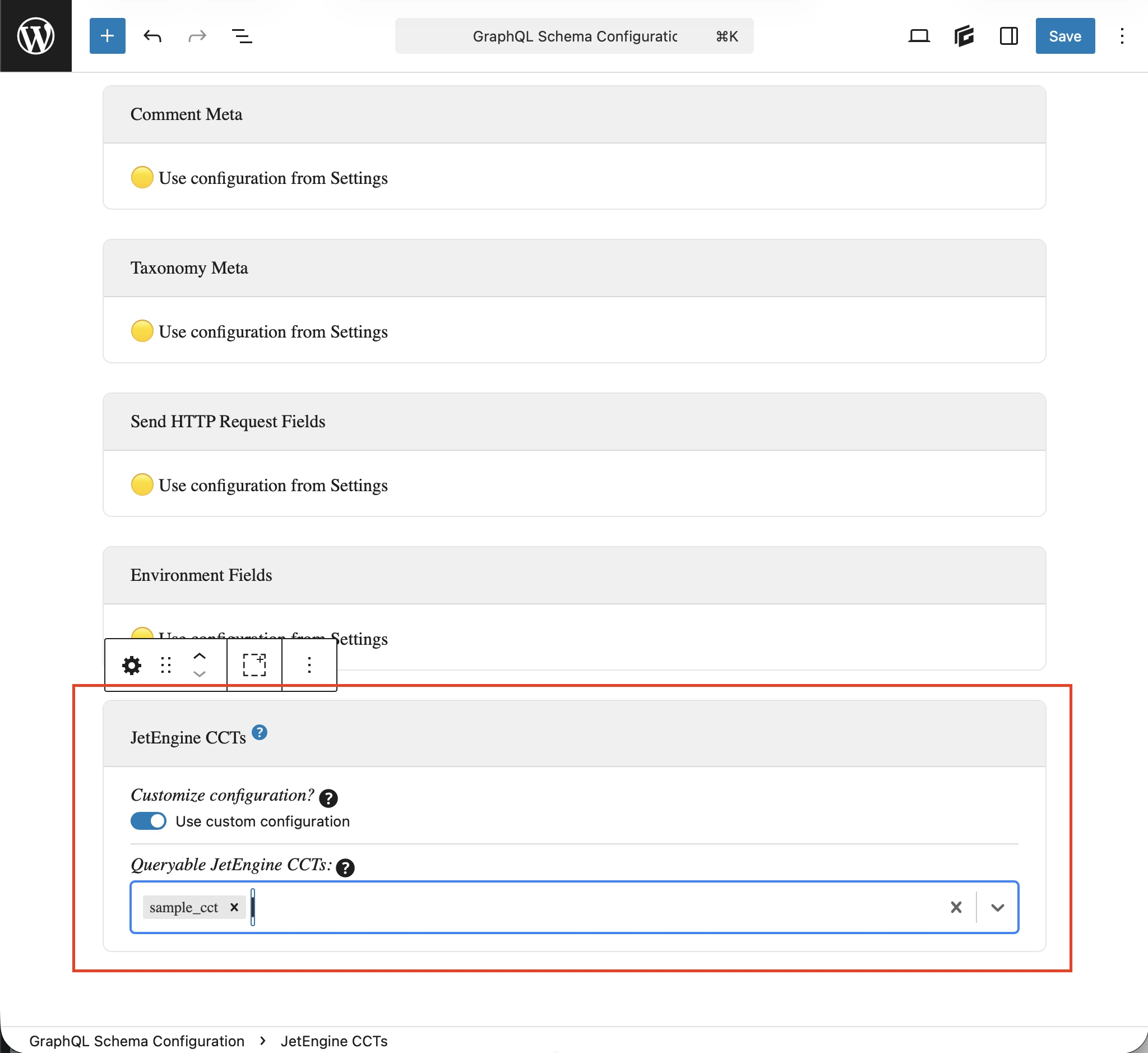
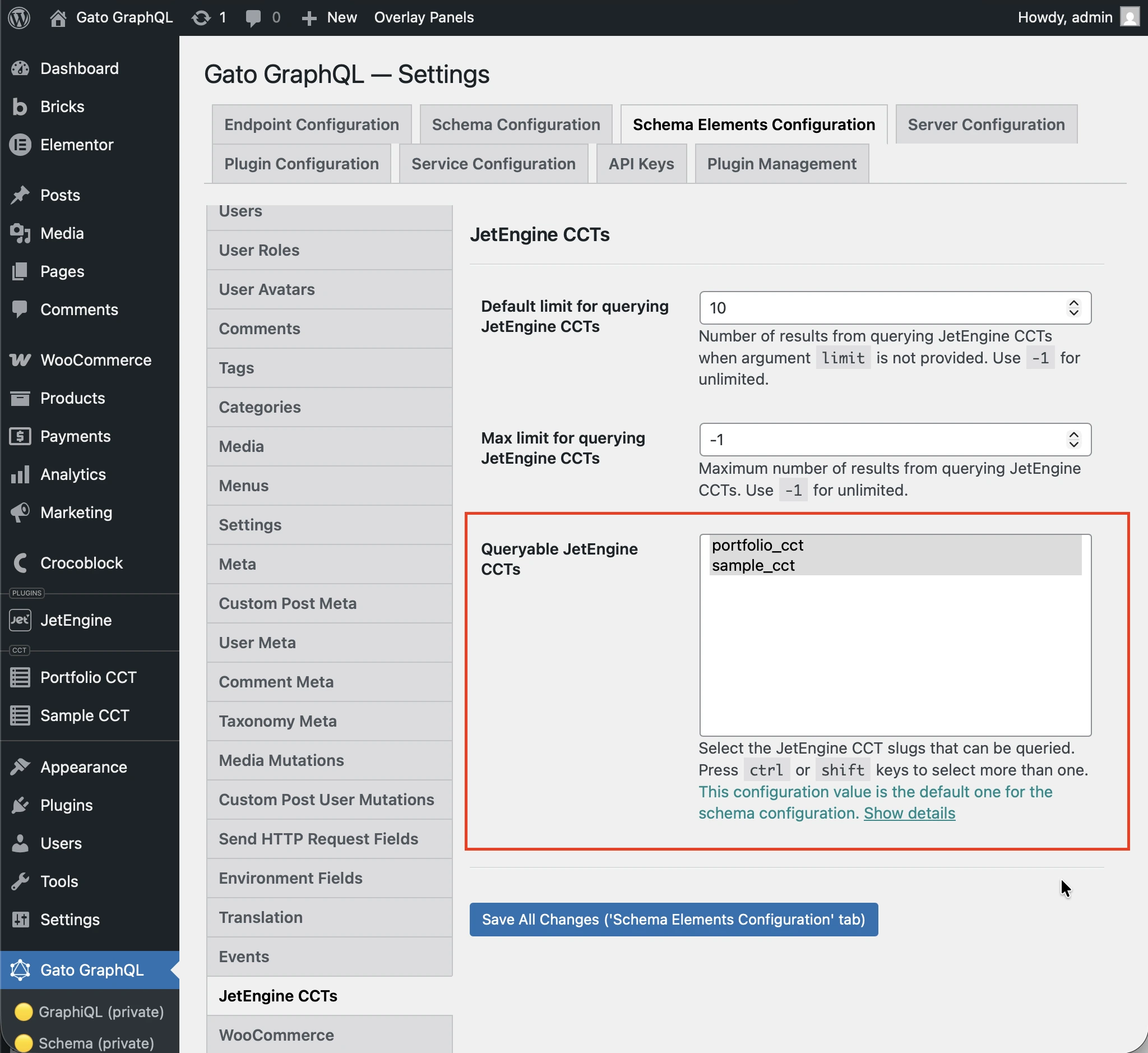
Aby przyznać dostęp do CCT, musi on zostać ustawiony jako odpytywalny w ustawieniach wtyczki.
Konfigurację można przeprowadzić w 2 miejscach, w kolejności priorytetów:
- Niestandardowa: W odpowiedniej Konfiguracji schematu
- Ogólna: Na stronie Ustawień
W Konfiguracji schematu zastosowanej do endpointu wybierz opcję Użyj niestandardowej konfiguracji i wprowadź żądane wpisy:
W przeciwnym razie zostaną użyte wpisy zdefiniowane w opcji Queryable JetEngine CCTS w sekcji JetEngine CCTS w Ustawieniach:
Przykładowe queries
Lista wpisów CCT:
query {
jetengineCCTEntries(cctSlug: "sample_cct") {
id
uniqueID
cctSlug
status
createdDate
modifiedDate
authorID
author {
id
name
}
singleCustomPostID
singleCustomPost {
id
title
}
fieldValues
someField: fieldValue(slug: "some_field_slug")
}
}Pojedynczy wpis CCT według slugu i ID:
query {
jetengineCCTEntry(cctSlug: "sample_cct", by: { id: 1 }) {
id
uniqueID
cctSlug
status
createdDate
modifiedDate
author {
id
name
}
singleCustomPost {
id
title
}
fieldValues
someField: fieldValue(slug: "some_field_slug")
}
}Lista i liczba wpisów CCT z filtrem, paginacją i sortowaniem:
query {
jetengineCCTEntryCount(
cctSlug: "sample_cct"
filter: { search: [{ field: "cct_author_id", value: 1, operator: EQUALS }] }
)
jetengineCCTEntries(
cctSlug: "sample_cct"
filter: { search: [{ field: "cct_author_id", value: 1, operator: EQUALS }] }
pagination: { limit: 10, offset: 0 }
sort: { by: "cct_created", order: DESC }
) {
id
authorID
}
}